Using menu context of
tree structure
1. Choose the target
- selected node - if this is important for
what you have to do
2. Right click with
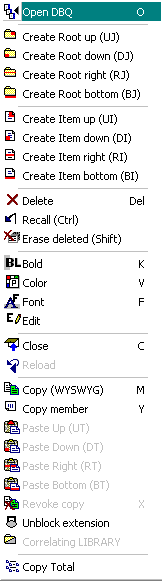
mouse to expand the menu context from fig. 1
Observations :
a) = Some options from
menu context could be disabled if you consider different situations
b) = Shortcuts are
available only when extensions are disabled
c) = If extensions are
activated when you execute right click with mouse then
all extensions are closed
Fig. 1 - The menu context of
tree structure
_____________________________________________________________________
Powered by Quizoodd software .http://gridnet.ro
Please use the above link if you do not see 2 frames
The current item selected is ... [ Using menu context of tree structure ]
Your MAP to ROOT
1.2.3 = Details about Quizoodd Pro